 Account and Billingless than a minute read
Updating Account Info
Learn about Updating Account Info for VPS, Dedicated Servers, and Game Hosting on Atomic Networks services.

How to Update Account Info - Atomic Networks
In rare circumstances, you may not be able to complete a purchase through our billing panel. Usually, this is because your Account Info is not accurate or up to date. Keeping your account information up to date is important to ensure that your invoices are correct.
To update your account info, follow the steps below.
Step 1: Navigate to the "Account Details" page in the Billing Panel.
Step 2: Update Your Account Info
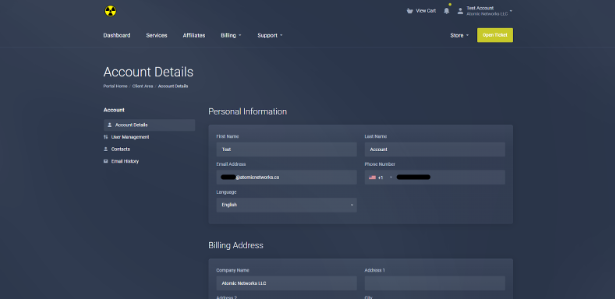
Here, you can change important information in your Billing profile, such as:
- First and Last Name
- Preferred Language
- Billing Address
- And more…
Note: By updating your details in the Billing Panel, you are not updating the credentials on your panel logins for the Web, Game, VPS, and Dedicated Server panels.
Step 3: Save Your Changes