
 Garry's Modless than a minute read
Switch Your GMod Server to x64 Branch
Learn about how to setup automatic workshop downloading for addons on your GMod server with Atomic Networks.

x64 Branch provides marginal improvements to client and serverside performance. It might be worth it for you to experiment with this branch if you have addons that made use of multithreading or specifically have x64 branch as a recommendation in their documentation.
Warning: Do not enable x64 branch unless specifically recommended by an addon. If you notice issues either in game or performance wise, disable x64 branch immediately.
Step 1: Navigate to Atomic Panel
Click here to navigate to Atomic Panel. You can log in using your account credentials that you received following checkout. The credentials email is sent to the email address on file in the Billing Panel.
Step 2: Navigate to the Startup Parameters Tab Under Configuration
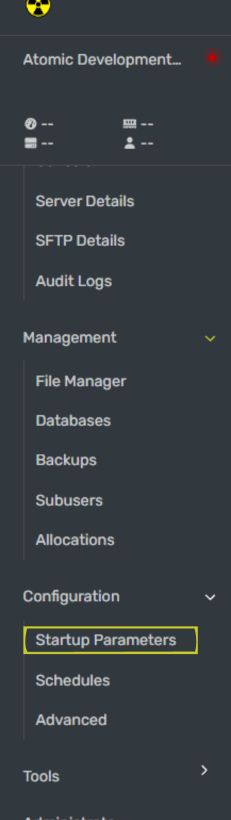
Once you have opened the Startup Parameters menu, enable the x64 branch of GMod by clicking the toggle button under "x64 Branch"
Step 3: Restart Your GMod Server
Once you have configured x64, restart your GMod server for x64 branch to enable.